Where to see your accrued vault yield, leaderboard Shells, Liquidity Campaign rewards, and Streams rewards as a liquidity provider, and how to claim.
A single vault deposit can earn you up to four things at once: the vault’s base yield, leaderboard Shells, Liquidity Campaign rewards, and Streams rewards. They accrue in different ways and show up in different places. This page is the map.
Everything here is read from the Turtle app using the same wallet you deposited with. You do not register anything separately; rewards attach to your deposit automatically.
The base yield from the vault’s underlying protocol accrues to your position continuously. You see it in two places.Portfolio › Positions lists every position with its amount, price, value, and Est. Total APR. The Manage button opens the position.The Your Position tab of the opportunity page shows a Position Value chart over 7D, 30D, 90D, or 1Y, plus Current value, Receipt balance, Est. annual yield, and Vault share.
The Your Position tab shows the value of one position over time.
Depositing into eligible vaults earns you Turtle Shells toward the Liquidity Leaderboard. Shells accrue from the value you deposit, with boosts for referred liquidity, social connections, and staking. Your Shell total shows in the top bar next to your wallet address. Your rank lives on the Leaderboard page.Many vaults also carry a Turtle Shells Stream. It appears as a badge in the opportunity header, as a Turtle Shells stream line in the deposit panel’s APR breakdown, and as a row in the Incentive Streams table. Shells earned this way also show under Earnings on the Your Position tab, with Turtle as the provider.For the full scoring rules and what counts, see the Liquidity Leaderboard.
If you deposited into a vault with an active Liquidity Campaign, you earn additional token emissions on top of the base yield, in proportion to the liquidity you contributed over the campaign period. Liquidity Campaign rewards are calculated when the campaign settles and distributed afterward, rather than streaming to you in real time.Once distributed, they appear in Portfolio › Earnings like any other claimable reward.
If a vault you are in has an active Streams campaign, you earn that stream’s reward token or points. How rewards accrue depends on the stream type, which the app shows in the Type column of every streams table.
Type
How it pays
Points
Points accrue continuously per dollar per day (for example, 34 Turtle Shells /$1k·d). There is no on-chain claim; points are tracked off-chain.
Fixed APR
A token reward at a fixed rate on your TVL over time. It becomes claimable as each on-chain snapshot lands.
Deposit Ladder
A token reward paid as a lump on each cliff day. You must hold the deposit until the cliff. Leaving early forfeits the tier in progress.
The stream’s own page (Streams › click a row) shows the full terms: Who can earn, When it pays, Leaving early, and Minimum hold. Its Your earnings table lists each of your deposits with its status, days held, earnings, realised APR, and next cliff.
A stream page. The simulator on the right shows what a deposit earns at each hold time.
Rewards that are still vesting toward a cliff appear under Vesting Rewards at the bottom of Portfolio › Earnings, with the deposit date, cliffs reached (for example, 2/9), projected reward, and status.
All claimable rewards, from every vault and every provider, collect in one table. It takes three steps.
1
Connect your wallet
Open the Turtle app and connect the same wallet you deposited with. Rewards are tied to that wallet, so claiming from a different one shows nothing to claim.
2
Open Portfolio › Earnings
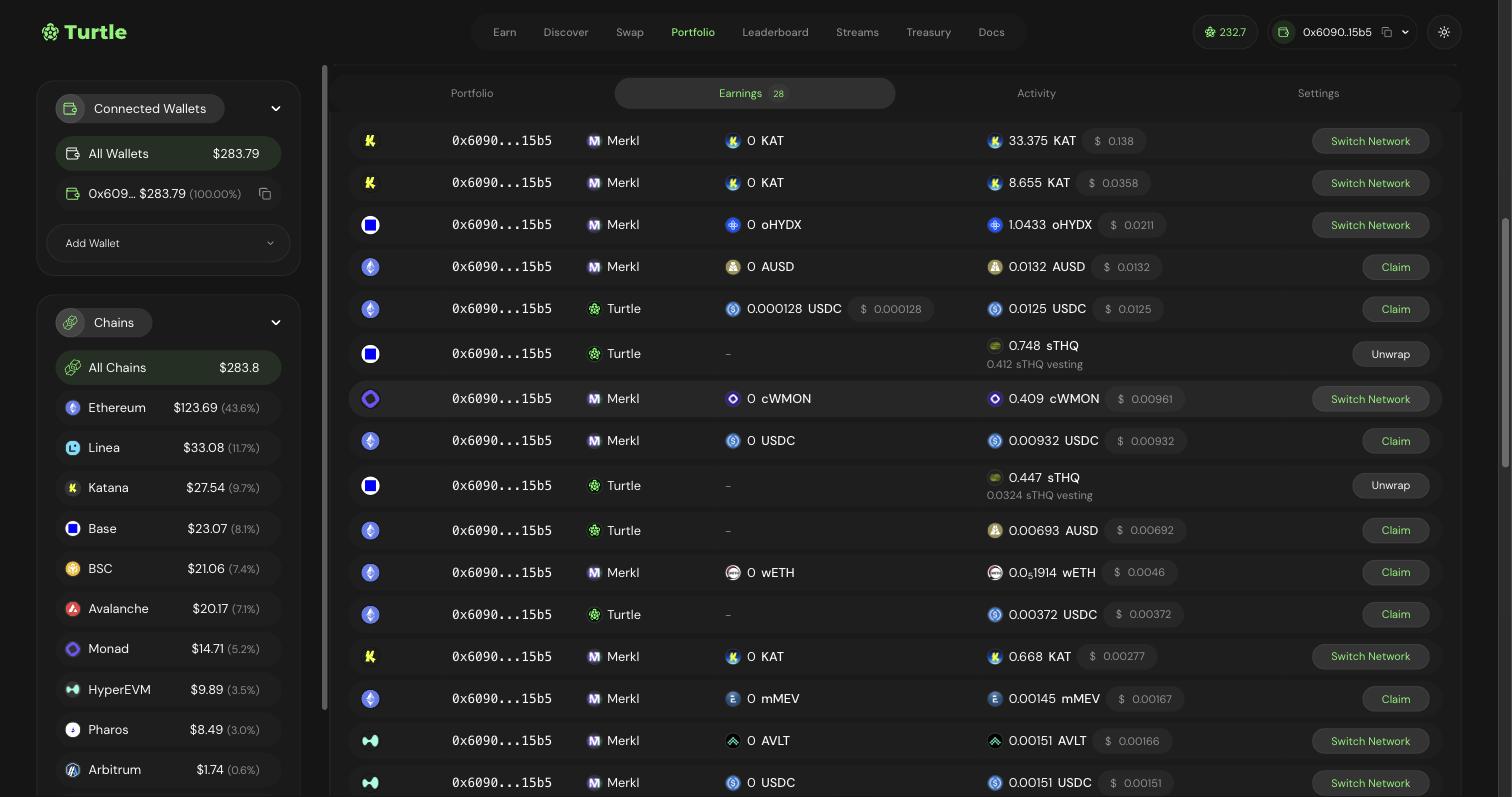
Go to Portfolio and click the Earnings tab. The badge on the tab counts your claimable rewards. Each row shows the chain, wallet, provider, amount already claimed, and amount claimable.
The Earnings tab lists every claimable reward with a Claim button.
The Provider column tells you who pays the reward. Turtle rows are Streams rewards and other Turtle-distributed rewards. Merkl rows are protocol incentives distributed through Merkl that Turtle surfaces for you.
3
Click the action button
The button at the end of each row depends on the state of the reward.
Button
Meaning
Claim
Your wallet is on the right chain. Click, then confirm the transaction in your wallet.
Switch Network
The reward is on a different chain from your wallet. Click to switch, then claim.
Unwrap
The reward is a wrapped or vesting token. Click to unwrap the unlocked part. The row shows how much is still vesting.
Claims are cumulative, so a single claim always pays the full outstanding amount. Balances that are committed on-chain stay claimable even after a campaign ends.
Rewards that cannot be claimed yet are hidden by default. Click Show non-claimable under the table to see them.You can also claim from one vault at a time: the Earnings table on the Your Position tab of an opportunity page shows the same rows for that vault only.
Claiming Streams rewards
For partners building their own claim flow: how stream rewards are claimed through Turtle, embedded in a partner’s app, or claimed for users automatically.
Rewards stack. One deposit can earn vault yield, Shells, a liquidity campaign, and a Stream at the same time, with no extra steps from you.
Points and rewards attach to the wallet you deposited with. Use that wallet to view and claim. You can add more wallets under Connected Wallets on the Portfolio page to see them together.
Streams rewards stay claimable after a campaign ends; what is committed on-chain remains yours to claim. See Claiming rewards.
Deposit Ladder rewards are different: each tier pays only on its cliff day, and withdrawing before the cliff forfeits the tier in progress.