

Monitor performance
Track a live stream from two places: the Distribution Dashboard for a visual read on participation and accrued rewards, and the wallets endpoint for the underlying per-wallet data. The Streams overview shows every stream with its incentive APR, cost per $1k of TVL per day, distributed and remaining balance, projected spend, and a health score, alongside portfolio-level figures: qualified TVL, average incentive APR, LPs incentivised, and estimated monthly burn. The Distribution Dashboard adds participants, recent snapshots, and accrued rewards over the life of the stream. See Distribution Dashboard for the full view.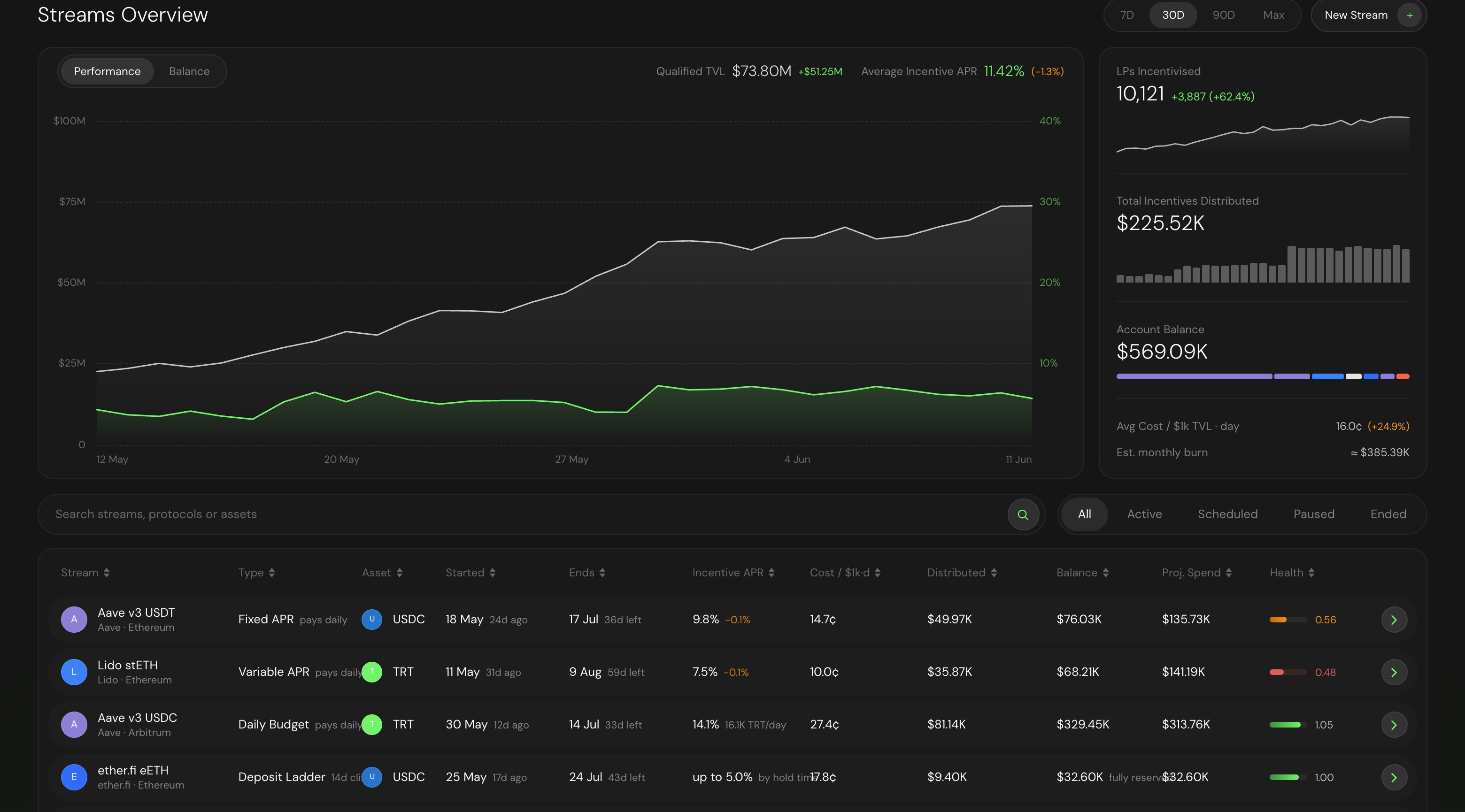
The Streams overview: portfolio metrics on top, per-stream performance and health below.
GET /v2/streams/{id}/wallets returns each participating wallet, its TVL contribution, and its accrued reward balance. See Get Wallets.
The reward updater runs about twice per day, so accrued figures reflect the most recent snapshot rather than the current second. A new stream’s first snapshot lands within about 12 hours of creation.
Top up or extend
A stream’s total amount and duration are fixed at creation: streams are fully collateralized upfront, and the budget cannot be increased or decreased after launch. If you want the campaign to keep paying past what the original budget covers, plan the budget accordingly at creation — the end date is bounded by budget from the start (see Create a Stream) — or launch a follow-on stream when the first one ends. Adding and withdrawing funds on a live stream is in development. Until it ships, treat the budget as immutable. Withdrawing from a live stream follows the same rule in reverse: funds can be recovered only once the campaign has ended (the leftover), or for any amount above what the stream needs to stay fully collateralized.Pause or resume
Pausing halts reward accrual. While a stream is paused, no new rewards are computed for the time it sits paused, so that window does not count toward any wallet’s balance. Resuming starts accrual again from the resume point. Pausing does not touch rewards that already accrued. Anything committed on-chain before the pause stays claimable, and LPs can still claim during a pause.End a stream early
Ending a stream early stops accrual immediately. No further snapshots add to wallet balances after the end point. LPs keep access to rewards that were already committed on-chain. Ending early closes the campaign without taking anything away from depositors who earned during the active window. They can claim before or after you end it.Recover unclaimed funds
After a stream ends, any reward tokens that LPs never claimed can be recovered by an authorized role. This returns leftover funds rather than leaving them stranded in the Stream contract.How LPs claim
LPs claim on their own schedule. The backend commits a Merkle root of the latest snapshot on-chain (roughly every 12 hours), and a wallet submits a Merkle proof to receive its rewards. Claims are cumulative, so a single claim transaction always pays the full outstanding balance. For TVL-based streams, each commit makes newly accrued rewards claimable; for deposit-based streams, rewards become claimable at each cliff.Because claims are cumulative, an LP never has to claim on a schedule to keep up. One claim at any time pays everything committed so far.