> ## Documentation Index
> Fetch the complete documentation index at: https://docs.turtle.xyz/llms.txt
> Use this file to discover all available pages before exploring further.
# Managing Liquidity Campaigns
> Monitor performance, adjust, and wind down a live liquidity campaign after launch.
Once a liquidity campaign is live, LPs deposit into the associated vaults and Turtle attributes the resulting TVL. From there you watch performance, adjust the liquidity campaign while it runs, and settle it at the end. This page covers the post-launch lifecycle from the [Liquidity Campaigns dashboard](https://dashboard.turtle.xyz), the protocol-facing section of the Client Portal. If you have not launched yet, start with [Launch a Liquidity Campaign](/products/deals/launch-a-deal); for what a liquidity campaign is, see the [Liquidity Campaigns overview](/liquidity-products/turtle-deals).
| Feature | Description |
| -------------------------------------------- | ---------------------------------------------------------------------------------------------------- |
| **Submit new deals**
**(coming soon)** | Propose a new incentive deal for Turtle's member network. Turtle reviews and approves before launch. |
| **Manage active deals** | View deal status, emission schedules, and eligible deals. |
| **Track member activity** | See deposits, withdrawal activity, and unique wallet counts attributed to your deal. |
| **Monitor TVL impact** | Track how much Turtle-attributed TVL is deployed in your protocol over time. |
| **View deal history** | Access past deals with their final TVL figures and settlement data. |
Specify the integration details, deal diligence, emission token rate, and campaign duration.
The Turtle team reviews the proposal including diligence on the protocol and vault safety.
Once approved, the deal appears as an opportunity in the Turtle app. Members can start depositing.
Monitor real-time metrics in the dashboard (deposits, TVL, wallet counts) throughout the deal period.
Which of these actions you do in the Client Portal versus with the Turtle team is still being confirmed, so each section below flags what needs checking against the live product.
## Monitor performance
The Liquidity Campaigns dashboard shows how your live liquidity campaign is performing: Turtle member deposits, unique wallet counts, and the attributed TVL deployed in your protocol over time.
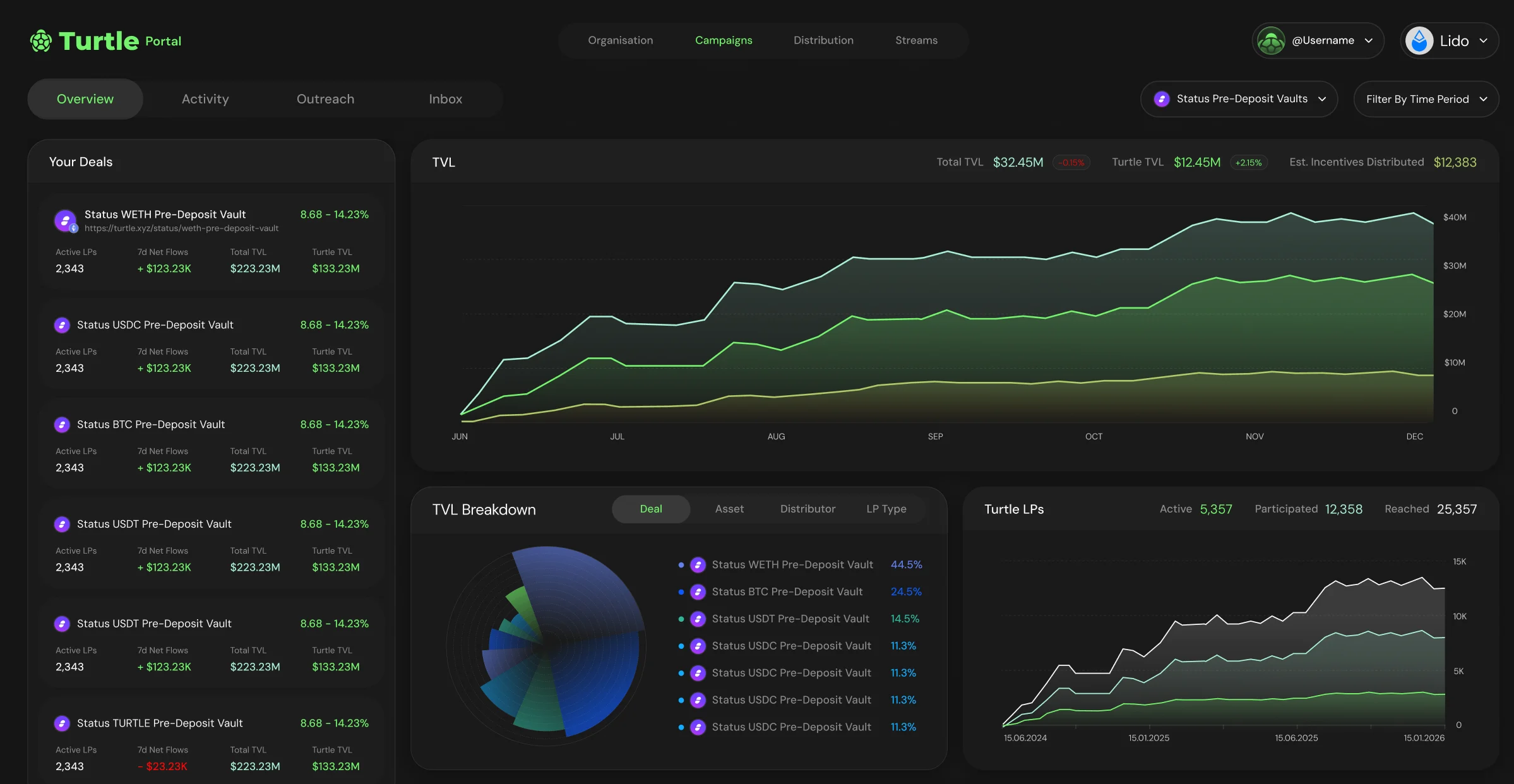 The figures here are scoped to the liquidity campaign and measured against Turtle Network TVL, the same basis fees are charged on. The headline numbers to watch:
* **Deposits and member activity:** deposits and withdrawals from Turtle members attributed to the liquidity campaign.
* **Unique wallets:** how many distinct wallets have contributed liquidity.
* **Attributed TVL:** the Turtle-attributed liquidity deployed in your protocol, tracked over the life of the liquidity campaign.
For how that attributed figure is computed and charged, see [Pricing](/resources/pricing). For the wallet-level deposit feed behind these numbers, the distributor-scoped activity endpoint is documented at [Distributor Activity](/sdk/earn-api/deposits).
## Adjust a live liquidity campaign
A live liquidity campaign's terms (incentive rate, duration, eligible vaults, emission budget) are set in the signed statement of work. Changing them is a commercial change, not a self-serve toggle, so adjustments go through the Turtle team rather than a Portal field.
## Re-review and flagging
A live liquidity campaign can be re-reviewed and re-flagged by the [Turtle Due Diligence Council](/resources/turtle-due-diligence-council) if something material changes, for example a new audit finding, a change to custody or control, or a counterparty or oracle change.
## Wind down a liquidity campaign
When a liquidity campaign reaches the end of its duration, it stops accruing new rewards and the incentive window closes. Attributed TVL is reconciled for the final period and the liquidity campaign settles against the terms in the SOW.
LPs keep their positions and anything they have already earned. Winding a liquidity campaign down ends the additional rewards going forward, it does not remove liquidity or take back rewards already attributed. Opportunities available in a campaign will persist on Turtle in the general Discover page.
## How LPs see and claim rewards
LPs see the rewards they have earned in the [Turtle app](https://app.turtle.xyz) alongside their other Turtle activity, and claim there. You do not distribute rewards to LPs yourself; attribution and payout are handled through Turtle.
{/* VERIFY: confirm how liquidity campaign boost rewards are presented to and claimed by LPs (in-app directly, or via the leaderboard/points system), and link to the LP-facing rewards page once it exists. */}
The figures here are scoped to the liquidity campaign and measured against Turtle Network TVL, the same basis fees are charged on. The headline numbers to watch:
* **Deposits and member activity:** deposits and withdrawals from Turtle members attributed to the liquidity campaign.
* **Unique wallets:** how many distinct wallets have contributed liquidity.
* **Attributed TVL:** the Turtle-attributed liquidity deployed in your protocol, tracked over the life of the liquidity campaign.
For how that attributed figure is computed and charged, see [Pricing](/resources/pricing). For the wallet-level deposit feed behind these numbers, the distributor-scoped activity endpoint is documented at [Distributor Activity](/sdk/earn-api/deposits).
## Adjust a live liquidity campaign
A live liquidity campaign's terms (incentive rate, duration, eligible vaults, emission budget) are set in the signed statement of work. Changing them is a commercial change, not a self-serve toggle, so adjustments go through the Turtle team rather than a Portal field.
## Re-review and flagging
A live liquidity campaign can be re-reviewed and re-flagged by the [Turtle Due Diligence Council](/resources/turtle-due-diligence-council) if something material changes, for example a new audit finding, a change to custody or control, or a counterparty or oracle change.
## Wind down a liquidity campaign
When a liquidity campaign reaches the end of its duration, it stops accruing new rewards and the incentive window closes. Attributed TVL is reconciled for the final period and the liquidity campaign settles against the terms in the SOW.
LPs keep their positions and anything they have already earned. Winding a liquidity campaign down ends the additional rewards going forward, it does not remove liquidity or take back rewards already attributed. Opportunities available in a campaign will persist on Turtle in the general Discover page.
## How LPs see and claim rewards
LPs see the rewards they have earned in the [Turtle app](https://app.turtle.xyz) alongside their other Turtle activity, and claim there. You do not distribute rewards to LPs yourself; attribution and payout are handled through Turtle.
{/* VERIFY: confirm how liquidity campaign boost rewards are presented to and claimed by LPs (in-app directly, or via the leaderboard/points system), and link to the LP-facing rewards page once it exists. */}